
Add Playlist
Your playlists are placed in the Sound/BGM/Playlist folder, and they are simple JSON files. It contains 2 lists and a single bool value shuffle.
{
    "shuffle": true,
    "list": [
        "megalovania"
    ],
    "remove": [
        "024 PSML514",
        "023 mysterious-forest",
		"MySomeOtherBGM/*"
    ]
}The sound ID (not BGM ID) in list will be merged into the playlist, and remove will remove the entries (if present) from the playlist. You can also use existing game sound IDs.
You may also use wildcards as the list and remove entry, currently 2 patterns are provided:
"remove": [
	"**"
]Which will remove all entries prior to merging.
"remove": [
	"<dir>/*"
]Which will remove all entries from Sound/BGM/<dir>/ folder prior to merging.
Playlist Type
The playlist JSON file name should match one of the following:
"Global"- An existing playlist name
- A zone type name
- A zone ID with/without level
Here are some of the game playlists:
Playlists
- Battle [1]
- 102 punipuni
- Blank [4]
- 041 earlgrey
- 090 hirusagari
- 044 heya_guitar 1
- 043 Along-the-riverside-road
- Day [1]
- 004 hoshinokiseki
- Dungeon [4]
- 024 PSML514
- 022 Pyramid-naibu
- 023 mysterious-forest
- 048 nazoooki shinden
- Dungeon2 [6]
- 072 Netherworld_Shanty
- 077 dragon and toast
- 078 legend of one
- 079 koudou
- 080 big mojo
- 081 exotics
- Dungeon_Boss [1]
- 098 Pixel Myth
- EloMap [3]
- 006 elomap2
- 007 elomap3
- 059 tyris4
- Festival_Noyel [1]
- 051 yuki
- Festival_Olvina [1]
- 051 yuki
- Festival_Yowyn [1]
- 093 cat life
- Field [1]
- 015 Atlantean_Twilight256
- Hoard [1]
- 053 hoard
- Lot [1]
- 001 no bgm
- Night [2]
- 005 elomap1
- 004 hoshinokiseki
- Underground [2]
- 046 dwarf
- 047 nonbiri dwarf
Blank is the default playlist for all zones that don't have an explicit playlist defined.
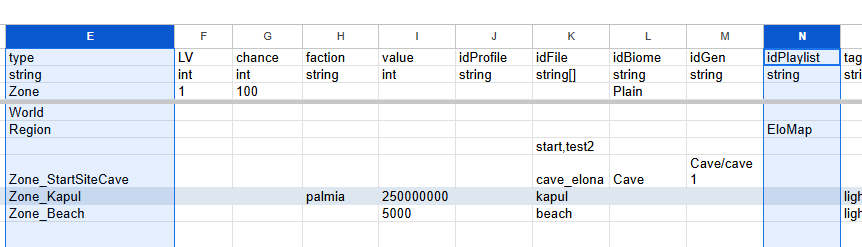
To view the zone type names and their playlists (if any):
Global Override
A special playlist named Global can be provided and it will be merged into all playlists.
Specific Playlist
For example, all nefia zones (Zone_RandomDungeon, Zone_RandomDungeonFactory, Zone_Mine...etc) share a playlist called Dungeon. If you want to add or remove songs for this playlist, you should use Dungeon.json in your Sound/BGM/Playlist/ folder.
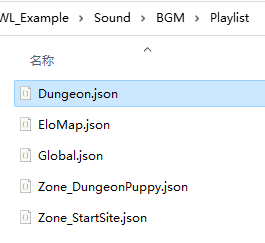
Your changes in Dungeon.json will be merged into game's Dungeon playlist, be it adding or removing songs. This will affect all zones that share this playlist.
Another common use case is to add songs when you are in overworld map. The overworld map is a zone type Region and it has a playlist EloMap.
Specific Zone Type
In addition to the playlist merge, you can also specifiy zone overrides for each zone type. These playlists will be using the zone type name, and its contents will be merged on top of the zone's default playlist (Blank if none specified in the sheet).
E.g. Zone_Vernis.json will merge into zone with type Zone_Vernis.
So, you could add songs to the overworld map playlist via Region.json instead of EloMap.json too, because overworld uses zone type Region.
Specific Zone ID
Sometimes, a zone type may have multiple different zones, and you can individually specify them using the zone ID.
For example, Zone_dungeon for Cave and Zone_dungeon_ruin for Ruin are both types of Zone_RandomDungeon, and you can specify them individually using their IDs.
When using the area ID, you can also append @N to indicate a specific level N, such as the lower level of Derphy being [email protected].
Merge Order
Multiple types of playlists will be applied in the order of Global, Specific Playlist, Specific Zone Type, and Specific Zone ID. They are also affected by your mod load order. Keep that in mind when you do nested remove, especially with ** or <dir>/* pattern matching.
Hot Reload/BGM View
After loading the save file in the game, you can view and control the current playlist using the CWL panel:
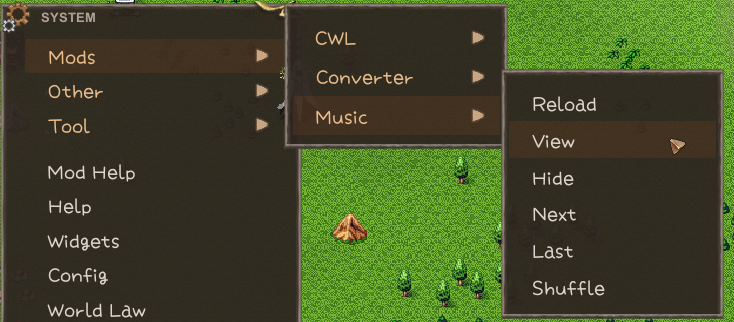
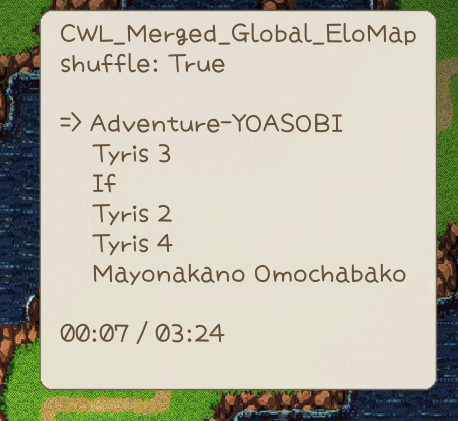
Once you have edited the playlist JSON while the game is running, you can hot-reload all playlists. Although the CWL has console commands for hot-reloading newly added audio files, it is not recommended due to potential indexing issues.
Examples
To remove all songs in overworld exploration playlist and add your new songs, define these in Sound/BGM/Playlist/EloMap.json or Sound/BGM/Playlist/Region.json:
{
    "shuffle": true,
    "list": [
        "my new BGM sound ID1",
        "my new BGM sound ID2"
    ],
    "remove": [
        "**"
    ]
}