
Drama
A drama is the rich dialog that usually has options and additional actions.
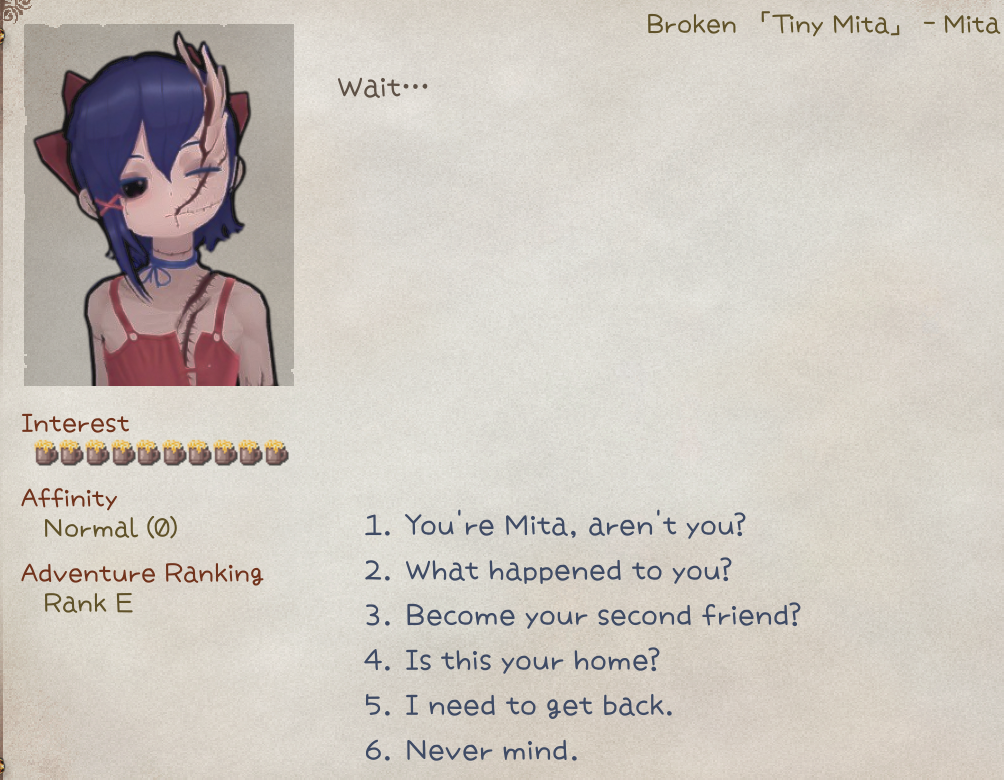
Routing
To give character a default drama, place id.xlsx in LangMod/**/Dialog/Drama/, using the character's ID as the file name (e.g., tinymita.xlsx for tinymita).
To use a different drama file, add the tag addDrama(DramaFileId) to the character's source row.
You can also use C# API chara.SetDramaOverride(DramaFileId) or chara.ShowDialog(DramaId, step).
Refer to the game sheets in Elin/Package/_Elona/Lang/_Dialog/Drama when making new drama sheets, or download the Tiny Mita example for a template.

Hot Reload
Drama sheets can be edited during gameplay. Changes apply automatically next time the dialog opens.
Definition
Line
A drama sheet is read top to bottom and consists of multiple lines. Each line has these fields (defined in the first row):
- step: Marks the start of a step; all following lines belong to this step until another
stepappears. - jump: The step to jump to after this line runs.
- if / if2: Conditions to check before execution. If
if2is present, both must be true. - action: The action to perform.
- param: Parameter for the action.
- actor: The speaker for the action or talk line.
?:???.tg: Target drama character. Default whenactoris blank.narrator: Default narrator.pc: Player.
- id: Unique ID, required for
textandchoicelines. Not needed for other lines. - text_XX / text_JP / text_EN / text: Dialogue content.
XXis a language code (e.g.,text_CN,text_ZHTW).textis the fallback if a non-builtin language is missing.text_JPandtext_ENis required, but you don't have to provide translations.
(Click to zoom) 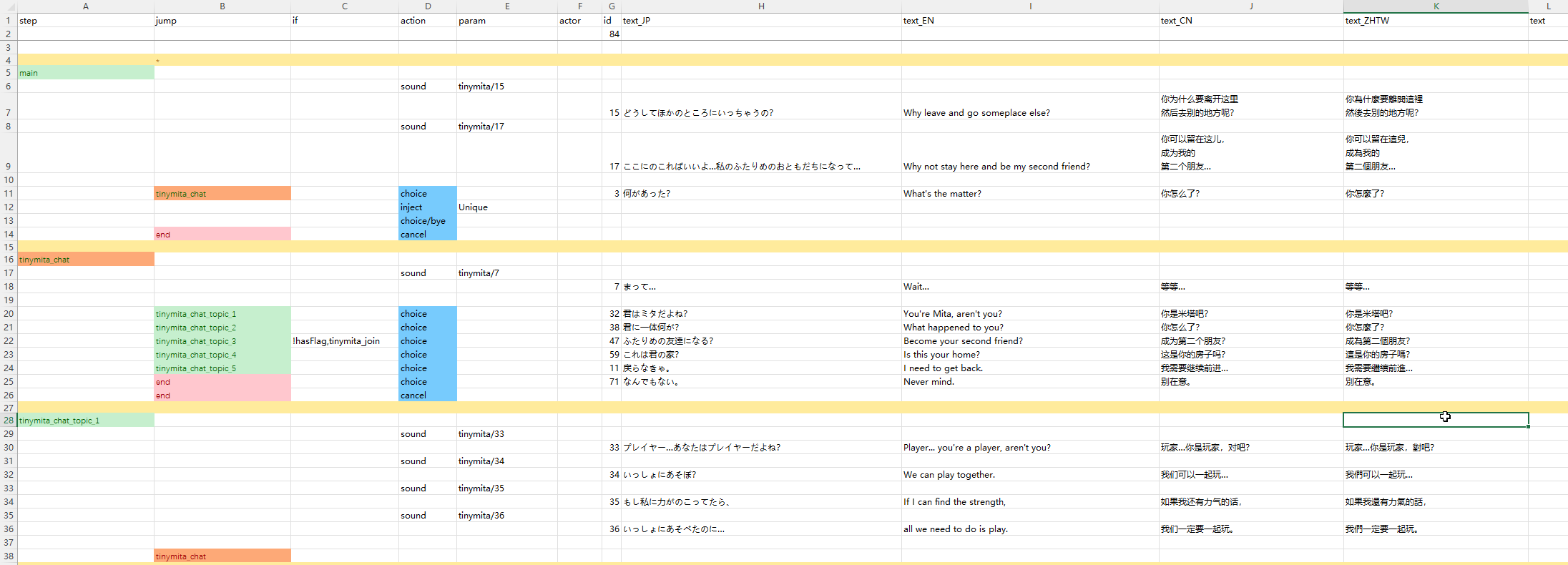
Step
Drama flow is organized into steps. Each step contains one or many lines, which can include dialogue, actions, and conditions.
main is the default starting step, and end exits the drama.
When creating a sheet, avoid creating step names starting with _ or flag to prevent conflicts with internal steps.
Builtin Steps
After executing inject/Unique action, a lot of builtin drama steps will be injected into the drama sheet. To use them, simply set them as the jump target. Some steps are already used in the default inject/Unique dialogues and you usually do not need to re-use them on your own.
| step name | usage |
|---|---|
_banish | End the drama |
_bye | End the drama |
_toggleSharedEquip | Toggle tg shared equipment usage |
_daMakeMaid | Set tg as maid |
_joinParty | If tg trait is joinable, set as party member. THIS IS NOT INVITING |
_leaveParty | Remove tg from party, and sent to home zone |
_makeLivestock | Set tg as faction livestock |
_makeResident | Set tg as faction resident |
_depart | Remove tg from faction |
_rumor | Rumor |
_sleepBeside | Toggle tg sleep beside player state |
_disableLoyal | Toggle tg loyal state |
_suck | tg sucks pc. Prioritizes blood sucking over cat huffing |
_insult | Toggle tg taunt state |
_makeHome | Set current zone branch as tg home branch |
_invite | Try inviting tg as ally, checks player attributes and tg invitable state. To unconditionally invite as ally, use expanded action join_party() |
_Guide | Guide player to a list of locations |
_tail | Have sex, for money |
_whore | Have sex, cost money |
_bloom | Deepen bond with tg |
_buy | Buy stuff from tg |
_buyPlan | Buy research plan from tg |
_give | Give stuff to tg |
_blessing | Blessing upon party |
_train | Train skills with tg |
_changeDomain | Change tg domain |
_revive | Revive dead allies |
_buySlave | Buy slave from tg |
_trade | Trade items with tg |
_identify | Identify items with tg |
_identifyAll | Identify all items with tg |
_identifySP | Identify items with tg using superior skill |
_bout | Challenge to a duel |
_news | Spawn a random dungeon on map |
_heal | Heal the player |
_food | Buy some food from tg |
_deposit | Deposit with tg |
_withdraw | Withdraw with tg |
_copyItem | Duplicate item with tg |
_extraTax | Pay additional tax |
_upgradeHearth | Upgrade hearth stone |
_sellFame | Sell fame |
_investZone | Invest current zone |
_investShop | Invest tg barter shop |
_changeTitle | Change player title |
_buyLand | Expand current zone map |
_disableMove | Set tg to not move |
_enableMove | Set tg can move |
Actions
Text lines are the most common. They only have id, text columns, and optionally if condition. When executed, text lines require player input (click or key press) to advance.
Action lines (except choice) execute automatically without input. If both action and text are present, text is generally ignored.
For example, an action line placed after a text line won't execute until the text line is clicked to advance.
Builtin Actions
| action | param | description |
|---|---|---|
inject | Unique | Insert "Let's Talk" and a lot of useful steps |
choice | Add a choice to the last text line. Requires text and jump | |
choice/bye | Insert a default bye choice | |
cancel | Set right click / escape key behavior. Requires jump, usually set to end | |
setFlag | flag name,value(optional) | Set a flag with value or default 1 if not provided |
reload | Reload the drama so any flag changes made in the current drama can be applied. Requires jump, usually set to main. Don't confuse this with hot reload during development - for that you only need to save the changes and it will be reloaded next time you start the drama | |
enableTone | Enable dialog tone for the entire drama | |
addActor | Add a drama actor to use later, text can be used to set a name override. This is done automatically when you fill in new id in actor cell. Requires character id in actor | |
invoke | method name | Call a method. All of them are hardcoded for specific use. |
setBG | image name(optional) | Set an image as background or use empty to clear it. Can be provided Texture folder |
BGM | BGM id | Switch the BGM to specific one by id. Check the Sound & BGM page for custom BGM |
stopBGM | Stop the BGM and do not continue | |
lastBGM | Stop the BGM and continue the last one played | |
sound | sound id | Play a sound by id. Check the Sound & BGM page for custom sounds |
wait | duration | Pause the execution in this line for seconds, good to use when you want the animation or stuff to finish |
alphaIn alphaOut | duration | Alpha transition(transparency) in seconds |
alphaInOut | duration,wait time | alphaIn first, wait in seconds, then alphaOut |
fadeIn fadeOut | duration,white/black(optional) | Fade transition in seconds |
fadeInOut | duration,wait time,white/black(optional) | fadeIn first, wait in seconds, then fadeOut |
hideUI | transition | Hide the HUD elements with a transition in seconds. Restored when exiting drama |
hideDialog | Hide the drama dialog so you can do cutscenes, however text lines force show dialogs, so you need to combine this with wait | |
end | Explicitly end the drama. Same as jump to drama step end | |
addKeyItem | keyitem id | Add keyitem with id to the player |
drop | item id | Drop an item as reward at player's position |
addResource | resource name,count | Add home resource by count |
shake | Shake the screen | |
slap | Slap the drama owner character | |
destroyItem | item id | Find and destroy the item with id from player's inventory |
focus | Immediately move and focus camera to the drama owner character | |
focusChara | character id,speed(optional) | Move and focus camera to the character with id on the same map |
focusPC | speed(optional) | Move and focus camera to the player |
unfocus | Reset and unfocus camera | |
destroy | character id | Destroy a character with id on the same map |
save | Save game | |
setHour | hour | Set the game time in hours |
When providing multiple parameters, they are separated by comma(,) with no spaces in between.
Text
Substitutions
| text | value |
|---|---|
#tg_his | tg's possessive pronoun |
#tg_him | tg's object pronoun |
#tg | tg character name |
#last_choice | text of the last choice |
#newline | newline character |
#costHire | cost to hire tg (number, localized) |
#self / #me | full name of character tg (including title) |
#his | tg's possessive pronoun |
#him | tg's object pronoun |
#1 ~ #5 | external variables refDrama1 ~ refDrama5 (number auto-formatted) |
#god | name of the god (if tg is not empty, uses its faith; otherwise random religion) |
#player / #title | player's title |
#zone | current zone name |
#guild_title | title of the guild associated with the current plot |
#guild | name of the guild in the current plot |
#race | player's race name |
#pc | player's short name |
#pc_full | player's full name (including title) |
#pc_his | player's possessive pronoun |
#pc_him | player's object pronoun |
#pc_race | player's race |
#aka | player's alias |
#bigdaddy | localized string "bigdaddy" |
#festival | festival name (if the zone has a festival, use its name; otherwise generic) |
#brother2 | "brother" or "sister" (based on player gender) |
#brother | random term for brother/sister (randomly from bro or sis list) |
#onii2 | random term for older brother/sister (from onii2/onee2 lists) |
#onii | random term for older brother/sister (from onii/onee lists) |
#gender | random term based on player gender (from gendersDrama list) |
#he | "he" or "she" (based on player gender) |
#He | same as above, but with initial capital letter |
Dynamic Content
Text columns starting with #eval <C# script here..> that returns a string can evaluate text content dynamically.
Conditions
Conditions determine whether the line should be executed or not.
Static Conditions
Static conditions are evaluated once on load.
Attach conditions to any line using the if (and optionally if2) column.
| Condition | Param | Description |
|---|---|---|
hasFlag | flag name | Player has flag and value ≠ 0 |
!hasFlag | flag name | Player doesn’t have flag or value = 0 |
hasMelilithCurse | — | Player has Melilith curse |
merchant | — | Player is at Merchant Guild |
fighter | — | Player is at Fighter Guild |
thief | — | Player is at Thief Guild |
mage | — | Player is at Mage Guild |
hasItem | item id | Player has the item in inventory |
isCompleted | quest id | Player has completed the quest |
Simple value checks (most common for flags/counters):
=,example_flag,1
>,example_counter,20
!,example_flag,69Most lines only need the if column. Add an if2 column if you need multiple conditions.
Dynamic Conditions
To enable/disable a line dynamically, use:
invoke*condition expression, orevalaction that returns abool

Branching
Set jump to a drama step to branch into that step.
Set jump to eval_result and use an eval action that returns a string to dynamically choose the jump target.

Invoke* Expression
In the drama sheet, a special action invoke* (or i* for short) can be used to call expansion methods: 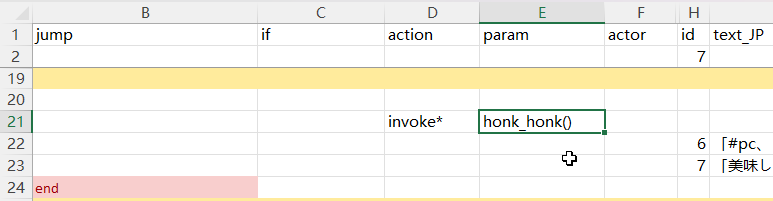
Syntax
The pseudocode syntax is simple, set action to invoke* or i*, and param to one of the valid methods:
| action | param | actor |
|---|---|---|
invoke*/i* | honk_honk(arg1, arg2) | pc |
This invokes a method called honk_honk with 2 parameters, arg1 and arg2.
Parameter
Parameters are separated by comma , and written within the parentheses of the expansion method, similar to code syntax. If there're no parameters, use empty () parentheses.
Most of the methods also take actor cell as the target character to execute the method on, such as pc or tg(the drama target character), or any valid character id. Default is tg.
If the jump in the same line has any value, then the return value of the expansion method will be used to determine if the jump can be executed. Returns true will execute the jump, otherwise not.
Value Expression Syntax
DramaValueExpression is used to evaluate or assign values.
Examples:
| Expression | Meaning |
|---|---|
69 | Assign value 69 |
=69 | Assign value 69 |
+5 | Increase original value by 5 |
-3 | Decrease original value by 3 |
*10 | Multiply original value by 10 |
/2 | Divide original value by 2 |
==69 | Check if equal to 69 |
!=114 | Check if not equal to 114 |
>10 | Check if greater than 10 |
>=20 | Check if greater than or equal to 20 |
<5 | Check if less than 5 |
<=3 | Check if less than or equal to 3 |
Expanded Actions
| method | param | description | jump |
|---|---|---|---|
add_item | item id, material alias(optional), level(optional), count(optional) | Add the item with id to actor, default random material, auto level, and count of 1 | always |
equip_item | item id, material alias(optional), level(optional) | Equip the item with id on actor, default random material, auto level | always |
destroy_item | item id, count(optional) | Destroy items with id on actor, default of 1 | always |
join_faith | religion id(optional) | Make actor join the specific religion with id or leave the current religion with empty religion id | If success |
join_party | Make actor join player party unconditionally | always | |
apply_condition | condition alias, power | Apply a condition with id to actor, default power 100 | always |
remove_condition | condition alias | Remove the condition on actor | always |
Expanded Scene Play
| method | param | description | jump |
|---|---|---|---|
move_next_to | character id | Move actor next to the character with id on the same map | always |
move_tile | x offset, y offset | Move actor with the relative tile offset, such as 1, 1 or 2, -1 | always |
move_to | x, y | Move actor to the absolute tile position on the map, such as 64, 44 or 12, 0 | always |
move_zone | zone id, level(optional) | Move actor to a specific zone with id, and specific level, default level 0 | if success |
move_zone_2 | zone full name | Move actor to a specific zone using zone full name syntax, such as derphy@-1 | if success |
play_anime | anime id | Play animation on actor | always |
play_effect | effect id | Play effect on actor | always |
play_effect_at | effect id, x, y | Play effect at tile position on the map | always |
play_emote | emote id | Play emote on actor | always |
play_screen_effect | screen effect id | Play screen effect | always |
pop_text | text | Pop a text bubble above actor head | always |
set_portrait | portrait id(optional) | Set actor portrait used during dialog to a specific one or reset with empty id, from Portrait folder, e.g. UN_myChara_happy.png could be set with happy or UN_myChara_happy | always |
set_portrait_override | portrait id(optional) | Set actor portrait used outside of dialog to a specific one or reset with empty id, from Portrait folder. Must be full id. This does not affect current dialog portrait(as changed above) | always |
set_sprite | texture id(optional) | Set the custom sprite override for actor or reset with empty id, from Texture folder | always |
show_book | category/book id | Open a book, supports LangMod/**/Text folder, for example, use Book/ok for Text/Book/ok.txt | If success |
Expanded Modifications
| method | param | description | jump |
|---|---|---|---|
mod_affinity | value expression | Modify actor affinity with value expression | If success |
mod_currency | currency type, value expression | Modify actor currency with value expression. money money2 plat medal influence casino_coin ecopo | always |
mod_element | element alias, power(optional) | Modifies a specified element (feat/resistance/skill, etc.) for the actor, default power 1. Different types of elements use different power scaling | always |
mod_element_exp | element alias, value expression | Modifies the exp of a specified element for the actor | If success |
mod_fame | value expression | Modify player fame with value expression | always |
mod_flag | flag, value expression | Modify the flag value from actor with value expression, such as +1, =1, 0. This supports non player character | always |
mod_keyitem | keyitem alias, value expression(optional) | Modify player's keyitem value with expression, default =1 | If success |
Expanded Conditions
These are still expansion methods that uses invoke* action same as above, but their return value is important.
| method | param | description | jump |
|---|---|---|---|
if_affinity | value expression | Check actor affinity with expression, such as <5, >=90, !=0 | If satisfies |
if_condition | condition alias | Check if actor has active condition with alias | If active |
if_currency | currency type, value expression | Check actor currency with value expression. money money2 plat medal influence casino_coin ecopo | If satisfies |
if_element | element alias, value expression | Check actor element with expression | If satisfies |
if_faith | religion id, reward rank(optional) | Check if actor is certain religion and above reward rank, default >0 | If satisfies |
if_fame | value expression | Check player's fame with value expression | If satisfies |
if_flag | flag name, value expression | Check actor flag value with expression, such as =5, 1, !=0 | If satisfies |
if_lv | value expression | Check actor level with value expression | If satisfies |
if_has_item | item id, value expression(optional) | Checks if actor possesses a quantity of the item that meets the expression, default >=1 | If satisfies |
if_hostility | hostility value expression | Checks if actor meets a specific hostility, such as =Ally or >Enemy. Value in ascending order: Enemy, Neutral, Friend, Ally | If satisfies |
if_in_party | true or false(optional) | Check if actor is in player's party, default to true | If satisfies |
if_keyitem | keyitem alias, value expression(optional) | Check if player has keyitem with expression, default >0 | If satisfies |
if_race | race id | Check if actor is of certain race | If satisfies |
if_tag | tag | Check if actor has certain tag defined in Chara row | If defined |
if_zone | zone id, level(optional) | Check if actor is in certain zone and optionally check level | If present |
if_zone_2 | zone full name | Check if actor is in certain zone with zone full name syntax, such as derphy@-1 | If present |
Special Methods
| method | param | description | jump |
|---|---|---|---|
console_cmd | cmd param1 param2... | Run console command | always |
eval | C# script or file with <<<path.cs syntax | Execute the C# script. It's recommended to use eval action (instead of invoke* with eval())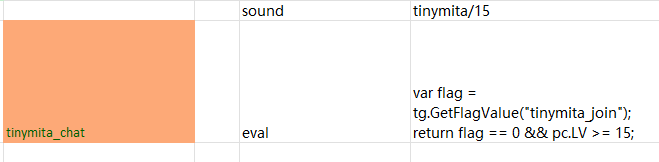 | If returns true |
and | and(if_flag(flag1, >0), if_flag(flag2, <0)...) | Take invoke* expressions as parameters, evaluates all of them | If all satisfies |
or | or(if_race(lich), if_race(snail)...) | Take invoke* expressions as parameters, evaluates all of them | If any satisfies |
not | not(if_zone(dungeon), if_zone(field), if_zone(underground)...) | Take invoke* expressions as parameters, evaluates all of them | If none satisfies |
API
Elin offers easy API to add custom expansion methods from your own script DLL.
Action Parser
Parsers are called on registered action lines that isn't builtin during drama loading, and are responsible for creating events.
[ElinDramaActionParser("my_action")]
public static bool ExampleParser(DramaManager dm, Dictionary<string, string> line)
{
    dm.AddEvent(new DramaEventTalk(line["actor"], () => {
        // processing
        return "A text line!";
    }));
    // this line is handled
    return true;
}
// or register manually
CustomDramaExpansion.AddDramaActionParser("my_action", ExampleParser);Action Invoke
Invokes are automatically compiled into invoke* expressions and are called when the line is executed during drama play.
[ElinDramaActionInvoke]
public static bool add_item(DramaManager dm, Dictionary<string, string> line,
                            string itemId,
                            string materialAlias = "wood",
                            int lv = -1,
                            int count = 1)
{
    var chara = dm.GetChara(line["actor"]);

    var mat = sources.materials.alias.TryGetValue(materialAlias, "wood");
    var item = ThingGen.Create(itemId, mat.id, lv).SetNum(count);
    chara.Pick(item);

    return true;
}

[ElinDramaActionInvoke("nodiscard")]
public static bool if_element(DramaManager dm, Dictionary<string, string> line,
                              string elementAlias,
                              DramaValueExpression expr)
{
    var chara = dm.GetChara(line["actor"]);
    return chara.HasElement(elementAlias) && expr.Compare(chara.Evalue(elementAlias));
}[ElinDramaActionInvoke]
public static bool console_cmd(DramaManager dm, Dictionary<string, string> line,
params string[] parameters)
{
string.Join(' ', parameters).EvaluateAsCommand();
return true;
}Drama invoke methods must be static, return bool, and paramters start with DramaManager dm, Dictionary<string, string> line.
The actual expression parameters can be auto converted by Elin, or passed as string[]. Auto convertable parameters can be any builtin data types, DramaValueExpression, or custom types with static bool TryParse(string, out T) method.
See CustomDramaExpansion implementation for example usages.
Scripting
You can run C# code directly in a drama sheet using the eval action.
It offers the same scripting capabilities as regular C#, with these differences:
- Script state is tied to the current drama instance (persists until the drama ends, then auto-resets).
- Shortcuts:
dm= DramaManager,line= current lineDictionary<string, string>,tg= targetChara,pc= playerChara.
Return value behavior:
bool+ validjumptarget → determines whether to jump.string+jumpcell set toeval_result→ uses the string as the new jump target.- No return value → treated as a simple action.
Import a script file from the same folder with: <<<script_snippet.cs
Passing Variables
Use the shared Script dictionary:
// First eval
var value = EClass.rnd(100) * 5;
Script["random_value"] = value;

// Later eval
var value = (int)Script["random_value"];Common Examples
| Function | Code |
|---|---|
| Jump to step | dm.Goto("my_new_step"); |
| Add "Let's chat!" option | dm.InjectUniqueRumor(); |
| Add temporary talk | dm.AddTempTalk("topic", "actor", "jump"); |
| Get Chara instance | var chara = dm.GetChara("tg"); |
| Recruit to party | chara.MakeAlly(); |
| Modify level | chara.SetLv(chara.LV + 5); |
Need help? Ask on Elona Discord: @freshcloth or reach via email.