
Custom Sound
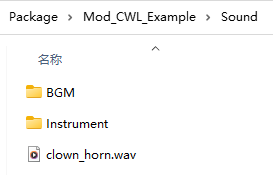
Sound files should be in one of acc, mp3, ogg, and wav formats, with the filename serving as the sound ID.
Metadata
A default metadata JSON is generated upon using the sound, allowing you to edit and apply sound file metadata on the next game launch.
Prefix ID
Subdirectories in the Sound folder will serve as ID prefixes. For example, AI_PlayMusic will use Instrument/sound_id, so you should place the sound file in the Instrument folder if you plan to replace instrument sounds.
A special prefix is BGM which will be instantiated as BGMData, see more here.
Replace In-Game Sound
You can override existing in-game sounds using the same ID.
For example, chicken uses sound ID Animal/Chicken/chicken, if you want to replace this sound, you should put your sound file named chicken with one of the supported formats, in your mod's Sound/Animal/Chicken/ folder.
Custom Folder
You can also do drop-in replacements in Custom folder.
Folder Location:
%localappdata%Low\Lafrontier\Elin\Custom\Sound\BGMIn-Game Access:
Config → Other → Open Custom Folder.
Using In Code
Sounds can be used in the game via sound ID.
pc.PlaySound("clown_horn"); // <- Card.PlaySound
SE.PlaySound("clown_horn");